Kakobuy Brand Pages vs Google Sheets
Kakobuy Brand Pages vs Google Sheets
Kakobuy Brand Pages vs Google Sheets: How to Create a Candidate Brand List First
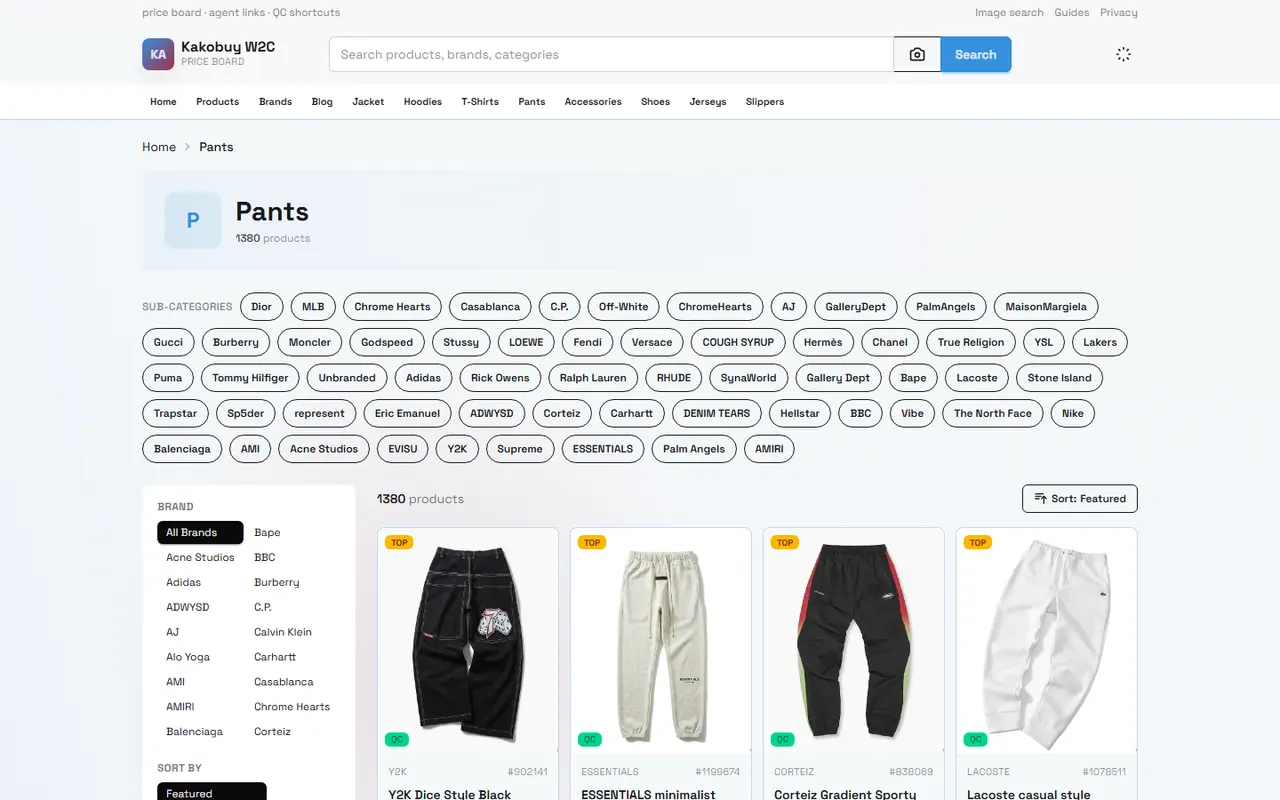
When you browse Chinese products on kakobuy, brand pages are suitable for discovering candidate brands, while Google Sheets is suitable for organizing those candidates into a list that can be further verified. The two serve different purposes: brand pages provide browsing leads, and the spreadsheet stores the basis for judgment and next steps.
This article is for buyers who have already seen multiple brand or product pages but have not yet formed a clear brand list. After reading, you can create a candidate table that includes brand name, category, product link, and verification notes. This article is not suitable for directly judging whether a brand is authentic or worth buying, and it cannot replace verification of product pages, seller information, or order status.
Define the Brand Browsing Task and Final List Format
Before starting, write the task as an achievable outcome rather than just recording "find brands." For example:
Organize 10 brands to be verified for a certain product category.
Keep one product page for each brand that can be further checked.
Record the brand's category, candidate product, and still-unconfirmed questions.
After completing the initial list, decide which brands are worth continuing to check for inventory, size, material, seller, and shipping.
It is recommended to divide the table into two parts: "candidate information" and "verification status." The former records what you saw during browsing, and the latter records facts that still need to be confirmed on product pages. This avoids mistaking search leads for confirmed conclusions. 📝
What Browsing Leads Can kakobuy Brand Pages Provide?
Brand pages are primarily useful for discovering names and browsing directions. You can observe brand names appearing on the page, product categories, and product entry points related to the brand, and temporarily store useful candidates in the table.
However, brand pages usually only serve as a starting point. Seeing a brand name does not mean that every product under that brand has the same seller, inventory, size, material, or shipping conditions. In particular, different products may come from different stores, and page information may change over time.
When continuing to browse on kakobuy, you can follow this order:
First, determine the product category you are looking for, such as shoes, clothing, accessories, or electronics.
From the brand page, select candidate brands related to the target category.
Open a product page that can be further accessed and confirm whether the page displays a clear product name and basic information.
Use the product page as the verification entry point in the table, rather than just saving the brand name.
For pages that cannot be opened, have insufficient information, or only have tag content, mark them as "to be rechecked" and do not treat them as valid candidates.
kakobuy provides services such as agent purchasing of Chinese products, warehousing, inspection, and international shipping. Product costs, international shipping fees, and possible customs fees are separate components, and the final cost cannot be judged solely from the brand page. According to platform information, international shipping fees are calculated based on product weight, shipping method, and destination, and the specific amount should still be confirmed during the actual ordering or shipping estimate process. 🚚
What Information is Suitable to Record in Google Sheets Brand Column?
The advantage of Google Sheets is that it is easy to continuously supplement, filter, and compare. The brand column should not only contain a name; it should also record where that name came from and what needs to be verified next.
It is recommended to record at least these fields:
Brand name: Record as displayed on the page, avoid rewriting or guessing.
Product category: For example, shoes, outerwear, bags, or electronics.
Brand page or product page source: Save the page entry point that can be further accessed.
Candidate product name: Record the specific product name displayed on the page.
Seller information: Fill in separately if the product page provides seller information.
Price and currency: Record only the price currently displayed on the page, and note the verification date.
Inventory or availability: Fill in "unconfirmed" if the page does not clearly state.
Specification information: Size, color, model, or other product options.
Verification status: Can use "candidate," "pending product page confirmation," "insufficient information," "not considered for now."
Notes: Record issues that need revisiting, such as material not specified, page not opening, or need to confirm return/exchange conditions.
If the table only has one brand column, it is easy to mix brands with the same name, different categories, and different sellers. At least add two columns for product category and product link, so that each row corresponds to a specific verification object.
Step-by-Step Process for Comparing Brand Pages to Spreadsheet
Step 1: Define the Scope of This Round of Screening
Write down the product category, destination, and budget range for this round only. The destination will affect international shipping routes, taxes, and customs requirements, so do not mix judgments for different destinations in the same column.
If you are only building a candidate brand library, you can skip filling in final shipping fees, but keep "shipping fee to be confirmed." This way, you won't mistakenly delete candidates due to temporarily missing cost data, and you won't treat unverified costs as confirmed costs.
Step 2: Record Brand Name and Corresponding Product
Every time you find a suitable brand, save a specific product as a sample at the same time. Do not just copy the brand name, because the same brand may include completely different categories and specifications.
The product sample should meet two conditions: the page can be accessed normally, and it has a clear product name and enough visible information to support subsequent verification. If the page redirects, returns empty content, or only has category tags, mark it as insufficient information.
Step 3: Use Consistent Verification Status
Using fixed statuses is easier to filter than free-form notes. For example:
Candidate: Discovered, product page verification not yet completed.
Pending product page confirmation: Page accessible, but price, inventory, specifications, or seller information still incomplete.
Insufficient information: Current page cannot support further judgment.
Not considered for now: Does not match this round's category, budget, or destination requirements.
Initial verification completed: Key fields on product page recorded, but does not mean confirmed authentic or ultimately suitable for purchase.
Step 4: Record Verification Date
Prices, inventory, product options, shipping fees, and page status may change. It is recommended to record the date each time you check, for example, "Verification date: September 28, 2026." If you reopen the page later, update the date instead of using the old record.
How to Separate Brand, Category, Product Link, and Notes into Columns
A practical table can use the following field arrangement:
Field | Purpose | Filling Reminder |
|---|---|---|
Brand name | Record the name displayed on brand page or product page | Do not complete or correct brand name from memory |
Product category | Distinguish shoes, clothing, bags, electronics, etc. | Record different categories of the same brand separately |
Product name | Corresponding specific product sample | Based on visible name on product page |
Product link | Return to specific product page | Mark status if page cannot be accessed |
Price and currency | Record the currently displayed price | Must include verification date |
Seller and specifications | Save information needed for later comparison | Fill in unconfirmed if not displayed |
Notes and next steps | Record gaps and actions | Clearly state where to go back to verify |
Brand columns are suitable for filtering, product link columns are suitable for return visits, and notes columns are for saving judgment boundaries. For example, "Brand name recorded, but material and seller not yet confirmed" is more useful than "looks good."
Do not treat the number of products shown on the brand page, platform introduction, or browsing order as a quality ranking. The purpose of a brand candidate list is to help you decide what to check next, not to make a purchase conclusion for you in advance. 🔎
What Information Needs to Be Verified on Product Pages
The following content should not be filled in as confirmed facts based solely on brand pages:
Current selling price and currency of the product.
Whether it is in stock, and which colors, sizes, or models are available.
Product material, dimensions, weight, and packaging information.
Actual seller and domestic shipping information within China.
Whether the platform's inspection scope applies.
Whether returns and exchanges are still within applicable conditions.
International shipping methods, destination restrictions, and fees.
Whether there are special category restrictions or customs requirements.
Platform information shows that inspection mainly checks appearance information such as style, quantity, color, size, and model, and conducts prohibited item screening; sealed packaging products may be inspected according to non-opening rules. Therefore, if your judgment depends on material, internal structure, function, or sealed content, the table should clearly state "needs further confirmation," and you should not expand the general inspection scope into a complete performance test.
Similarly, information about free storage, returns/exchanges, and promotions in platform materials should be based on current pages, order conditions, and applicable products. Special products may not be eligible for general return/exchange conditions, and whether a product is an exception should be confirmed before purchase. ⚠️
Suitable Scenarios for Website Spreadsheet vs Google Sheets
If your goal is to quickly discover products and brands, a website spreadsheet is more suitable as a browsing entry point. It can help you view candidate content by product category or brand direction.
If your goal is to build your own research records, Google Sheets is more suitable for saving brands, product samples, verification dates, pending questions, and filtering results. It is especially suitable for continuous supplementation after multiple browsing sessions and for quickly viewing rows with "insufficient information" or "pending product page confirmation" through filtering.
The two can be used together: the website spreadsheet is used to discover candidates, and Google Sheets is used to manage your own judgment process. Do not automatically treat content displayed on one platform as real-time inventory or prices on another platform; both should be based on the currently visible pages.
Next Actions After Completing the Brand Candidate List
When the list reaches the target quantity for this round, do not place an order immediately by brand name. First, address the unfinished verifications row by row:
Open the product page and confirm the name, price, specifications, and inventory status.
Record seller information and domestic shipping within China.
Check available shipping methods, shipping estimates, and possible customs requirements based on the destination.
Keep unconfirmable fields as unconfirmed, do not fill in with speculation.
Compare candidate products on a small scale, then decide whether to add to cart or submit an agent purchase request.
Save the verification date, and recheck highly volatile information before purchasing again.
If you plan to combine multiple products for shipment, also compare package weight, volume, route restrictions, fixed fees, and single loss risk separately. Combining packages is not always cheaper, and splitting packages is not always safer. The final choice should be based on your product type, destination, available routes, and actual quotes, not just the number of brands.
A good brand candidate list is not about having more brands, but about each row answering three questions: Why did this brand enter the candidate range? What is the specific corresponding product? What still needs to be verified next? When these questions can be answered in the table, you can move from the browsing stage to a more reliable product and logistics judgment stage. ✅
Agent Platform Shopping FAQ
1. Is the kakobuy spreadsheet website safe to use?
The kakobuy spreadsheet site does not gather any personal information; it functions only as a product listing for the kakobuy agent platform. All purchases and transactions occur on the kakobuy platform itself.
2. Which platform offers the best coupon deals?
kakobuy is my recommendation because it currently provides a $15 discount code with no minimum spending threshold. This is particularly beneficial for those ordering small packages. Use the promo code kakobuy888.
3. How do I search for a product I want to buy on kakobuy?
On kakobuy, you can perform a search with a single keyword or navigate to the category page, where items are also sorted by brand. Longer search phrases generally yield fewer but more accurate results than shorter ones. For instance, you could search for "Air Force 1 White," "sneakers," or just "Air Force 1."
4. What types of products can I find in the kakobuy spreadsheet?
The kakobuy spreadsheet includes a wide range of items such as shoes, clothing, bags, accessories, jerseys, perfumes, hats, scarves, belts, and various household goods.
5. How can I view quality inspection photos on kakobuy?
When reviewing QC photos on kakobuy, pay attention to the specific details of your purchased item. For shoes, examine key areas like the toe, heel, and tongue to assess stitching, structure, and tongue thickness for quality. For clothing, check the collar label, logo embroidery, fabric, and the smoothness of the collar and cuffs.
Browse our latest products and find your next favorite item.